
Week 10: Final Presentation and Transforming KB to XML

Day 1 & 2: Final Presentation

On the first day of this week, I worked on finalizing my presentation and shared it with my mentor. After receiving his feedback, I made changes and focused on rehearsing the final presentation that I had to present to the entire team of HPCC systems (Richard Chapman, Vijay Raghavan, Michael Gardner, Lorraine Chapman, David de Hilster) along with other interns of summer 2022. On Aug. 2nd, I presented about the expectations that were set in the beginning and amount of work accomplished during the nine weeks period. I am very happy that I received a positive feedback and appreciation from entire team and my mentor. Since the presentation could not be recorded due to technical issues in Lorraine’s network I will soon record my presentation and share it to my manager, Lorraine and mentor, David.

Day 3, 4 & 5: Transforming KB to XML

Though I already presented my work of this summer I still have three more weeks of work remaining during which I have to accomplish remaining expectations that was set in deliverables before starting the project. Therefore, I started working on writing code in NLP++ to transform knowledge base developed earlier to XML format using which XML file of each Wiktionary word entry can be formed. For that, since it failed to spray data file in the ECL Watch, I am now writing and displaying out in word.xml file. With the help of my mentor, I learned to transform the knowledge base to XML. While doing so, I learned to use While con, strstartswith, and strval function to create a while loop, condition if string starts with string name such as “pronunciation”, “definition”, “synonym”, etc., and get the string value of concept built in knowledge base respectively. The final output of XML file was created and was tested on all input word files. It is writing XML file correctly for each word content except for the case when there are more than phonetic/phonemic in the pronunciation record. For example, the final output of word ” ” in the XML format is as follows:

<word>
	<wordid>1</wordid>
	<word>जवाफ</word>
</word>
<pos>
	<wordid>1</wordid>
	<posid>1</posid>
	<pos>नाम</pos>
</pos>
<definition>
	<posid>1</posid>
	<defid>1</defid>
</definition>
<explanation>
	<defid>1</defid>
	<expid>1</expid>
	<text>उत्तर; उत्तर पक्ष; उत्तरा; प्रतिवचन</text>
</explanation>
<variation>
	<defid>1</defid>
	<varid>1</varid>
	<text>उत्तर पक्ष</text>
</variation>
<variation>
	<defid>1</defid>
	<varid>2</varid>
	<text>उत्तरा</text>
</variation>
<variation>
	<defid>1</defid>
	<varid>3</varid>
	<text>प्रतिवचन</text>
</variation>
<example>
	<defid>1</defid>
	<exampid>1</exampid>
	<text>श्यामले आफ्नो प्रियसीलाई छोडेर जाने कारण सोध्दा प्रियसीले केहि जवाफ दीनन।</text>
</example>
<pronunciation>
	<wordid>1</wordid>
	<phoneticid>1</phoneticid>
	<pttext>javāpha</pttext>
</pronunciation>
<synonym>
	<wordid>1</wordid>
	<synid>1</synid>
	<text>उत्तर</text>
</synonym>
<synonym>
	<wordid>1</wordid>
	<synid>2</synid>
	<text>प्रतिक्रिया</text>
</synonym>
<term>
	<wordid>1</wordid>
	<termid>1</termid>
	<text>जवाफदेही</text>
</term>
<term>
	<wordid>1</wordid>
	<termid>2</termid>
	<text>जवाफमाग्नु</text>
</term>
<term>
	<wordid>1</wordid>
	<termid>3</termid>
	<text>जवाफदिनु</text>
</term>
<language>
	<wordid>1</wordid>
	<langid>1</langid>
	<text>अङ्ग्रेजी</text>
</language>
<translation>
	<langid>1</langid>
	<transid>1</transid>
	<text>answer</text>
</translation>
<translation>
	<langid>1</langid>
	<transid>2</transid>
	<text>reply</text>
</translation>
<translation>
	<langid>1</langid>
	<transid>3</transid>
	<text>response</text>
</translation>

As shown above, I could able to transform the knowledge base of each word input file to the output in XML format.
Week 9: Remote Access to HPCC Systems Setup and Spraying Data files

Day 1, 2, and 3

After developing the knowledge base of wiktionary data, I started to access HPCC systems remotely. First, I tried to access the server remotely through Windows Subsystems for Linux (WSL) by following the guidelines: https://github.com/hpcc-systems/HPCC-Platform/wiki/Building-HPCC . While following step by step, I could able to install nodeJS for the Linux environment. However, when trying to install vcpkg I was having issues and was stopping installation in the middle. In the beginning, it was because my computer could not meet the installation requirement because of less memory space in the hard drive.

Then, I installed Oracle Virtual Box and created a virtual machine to complete building HPCC systems. Again, I found similar issues when trying to build multi-threading using CMake. Then, I tried accessing through a different laptop having Lixus operating system, but the multi-threading was still not running to 100% and I was having issues installing all required packages.

After that, as per the recommendation of my mentor, I again switched back to WSL. Even after taking the help from an expert in HPCC system, Michael Gardner, who is a software engineer III at LexisNexis, I couldn’t able to install vcpkg, and multithreading with –j4 was not still not running to 100%. With the help of StackOverflow, when I changed the threading to –j8 then the issue with multi-threading got resolved. However, I was still getting errors to build the HPCC system on WSL. In this way, after spending three days continuously working on accessing the HPCC system and failing to build it, my mentor developed a .deb package using which I could finally able to access HPCC systems by skipping all the steps of installing other packages.

Day 4 & 5

Spraying Data Files on HPCC system

After I could successfully be able to run HPCC system on WSL, I started HPCC system by running command cd/etc/init.d followed by sudo ./hpcc-init restart. By doing that, I could access ECL watch and by following the steps below one by one:

  • Start HPCC system using command on WSL
  • Open the http://127.0.0.1:8010/ to open the ECL Watch
  • Select files –> Landing zones
  • Click on upload and upload all files to spray
  • Click on BLOB and add target name and BLOB prefixClick on dropdown
  • click on “spray” button

When I clicked on spray button to spray my data files it failed spraying data files. Even after taking help of my mentor, David we couldn’t resolve it and I reached out to Michael Garderner and have been waiting for his response.

Week 8: Bug fixation in Knowledge Base and Preparation to Run it on HPCC Systems

Day 1

After knowing all the bugs in the analyzer sequences, I went through the analyzer sequences and made changes to the respective sequences where needed. As a result, I could able to fix most of the bugs such as the pronunciation zone was showing its content correctly though there were only phonetic(s) or phonemic(s) or both, [[ ]] were removed from most sections in each input file. However, there was still [[ ]] in some sections such as variation and definition sections which I could not remove. Additionally, the definition count was still wrong and gave counts of all definitions of that word instead of the count of definitions that were under a particular part of speech.

Day 2

I continued working on fixing bugs. While debugging, I came to know that the hierarchy of content zones was wrong for definition. Therefore, I had to add an “explanation” zone under the definition that takes care of the text in the definition zone. To fix the number of count of definitions for the respective part of speech, I had to make changes in the code of kbDefText, kbDefVariation, and add kbExp for explanation section of definitions. As a result, I obtained a complete knowledge base of word’s content and one of the example of knowledge base structure is as follows:

Word: answer (जवाफ)

words
  जवाफ: 
    pos=[1]
    pos1: 
      pos=[नाम]
      definition=[1]
      definition1: 
        explanation=[1]
        variation=[3]
        example=[1]
        explanation1: 
          text=[उत्तर; उत्तर पक्ष; उत्तरा; प्रतिवचन]
        variation1: 
          text=[उत्तर पक्ष]
        variation2: 
          text=[उत्तरा]
        variation3: 
          text=[प्रतिवचन]
        example1: 
          text=[श्यामले आफ्नो प्रियसीलाई छोडेर जाने कारण सोध्दा प्रियसीले केहि जवाफ दीनन।]
    pronunciation: 
      phonetic=[javāpha,javaapha]
    synonym: 
      synonym=[2]
      synonym1: 
        text=[उत्तर]
      synonym2: 
        text=[प्रतिक्रिया]
    derivedTerms: 
      derived=[3]
      derived1: 
        derivedTerms=[जवाफदेही]
      derived2: 
        derivedTerms=[जवाफमाग्नु]
      derived3: 
        derivedTerms=[जवाफदिनु]
    translation
      अङ्ग्रेजी: 
        translation=[3]
        translation1: 
          text=[answer]
        translation2: 
          text=[reply]
        translation3: 
          text=[response]

Day 3,4 & 5

After completing building knowledge base in NLP++, the next step was to get HPCC systems running on my PC. For this, I installed Ubuntu on windows and followed the link: https://github.com/hpcc-systems/HPCC-Platform/wiki/Building-HPCC to install NodeJs, Ubuntu, and complete required installation. However, I could able to install vcpkg on Windows subsystems for Linux (WSL) but, when I was trying to run sudo cmake -j4 package the compilation was not completing to 100% and stopping in the middle giving error. This may be occuring because of very less memory space left in my PC. Therefore, I tried another way i.e. by installing Ubuntu and running it on virtual box. I received similar error as on WSL while trying to complete configuration for HPCC systems on Ubuntu on Virtual Box. I spent three days and even after receiving help from my mentor and another expert, Michael Gardner, I still haven’t been able to resolve the issue.

Week 7: NeWiktionary Analyzer Dev. Continuation, KB Dev. Initiation and Testing, and Planning for Remaining Weeks

Day 1:

I completed parsing the Wiktionary data by building all the required analyzer sequences that match the pattern of word entry text in the Wiktionary word entry format.

Day 2 & 3:

I started to build a knowledge base (KB) by adding post areas in the existing analyzer sequences and even by building new analyzer sequences as needed. Some of the analyzer sequences I had to build to build a knowledge base are kbZones, kbPhonetics, kbPhonemics, kbDefText, kbVariations, kbExamples, kbDerivedTerms, and kbTranslations. These analyzer sequences help organize all the content of a word in the computer’s knowledge same as humans perceive these words’ content in their head. To illustrate, the following are codes written to build a knowledge base of kbZones that includes sub-zones of words such as pronunciation, synonyms, derived terms, and translations:

@NODES _ROOT

@POST
N("pronunciation") = makeconcept(G("word"),"pronunciation");

@RULES
_xNIL <-
	_pronunciations	### (1)
	@@

@POST
N("synonym") = makeconcept(G("word"),"synonym");

@RULES
_xNIL <-
	_synonyms	### (1)
	@@


@POST
N("derivedTerms") = makeconcept(G("word"),"derivedTerms");

@RULES
_xNIL <-
	_derivedTerms	### (1)
	@@

@POST
N("translation") = makeconcept(G("word"),"translation");

@RULES
_xNIL <-
	_translations	### (1)
	@@

In the above code, makeconcept creates concept in knowedge base for the particular zone of word’s content where text from each subzone will be added.

I also learned to use MakeCountCon which counts all the entries of a particular concept such as if there are more than one part of speech or multiple definitions in the def zone then it counts all and posts under the same zone i.e. pronunciation zone or def zone respectively. The code examples of MakeCountCon are as follows:

@NODES _posZone

@POST
N("con",1) = MakeCountCon(X("con"),"definition");

@RULES
_xNIL <-
	_defZone	### (1)
	@@
@PATH  _ROOT _posZone _defZone _definition _headerZone _LINE _item

@POST
L("con") = MakeCountCon(X("con",3),"variation");
addstrval(L("con"),"text",N("$text",2));
singler(2,2);

@RULES
_variation <-
	\;								### (1)
	_xWILD [plus fail=(\; । _xEND)]	### (2)
	@@

In the above code block, variation is parsed and added to the knowledge base using NLP++. we have defined variations as different forms of definitions or different ways to say the same meaning. In our knowledge base, variations are parts of the definition separated by “;” in the definition text and there can be one or more variations of definition so, I used MakeCountCon to count all the concepts of variations and post them in their respective zone.

In this way, I build all the knowledge base analyzer sequences and could add all the content of word in it.

Day 4 & 5

On the fourth day, I ran a newly developed analyzer (having analyzer sequences to parse the word content and zones along with knowledge base analyzer sequences) on all input .txt files of words to test if it works for all kinds of input data. While running the analyzer, I found some bugs such as those words having only phonetic/phonemic or more than one phonetics/phonemics was not showing in the output of knowledge base, definitions count was wrong for many words, [[ ]] was not removed from many word’s defText and variations which creates a link for the particular word that shows the very word in either red or green color (red shows that word is not added to Wiktionary yet whereas word in the green text means it is added to the Wiktionary and can be opened to view its content.

Planning for Remaining Weeks

I had a meeting with my mentor, David to plan and discuss about work to accomplish in the remaining weeks. During that meeting, we discussed about our targetted goal which is to build a dictionary in NLP++. For this, first, I will have to take the NeWiktionary analyzer that I have built and run it on HPCC systems, design a record structure in database format having word, definition, pronunciation, parts of speech, definitions, examples, derived terms, synonyms, and translations in English. To do this, I have to download Ubuntu on Windows, run HPCC systems on it, and finally build a dictionary for NLP++ from the Knowledge base of Wiktionary data.

Week 6 Day 4 & 5: Mid-term Evaluation and NeWiktionary Development Cntd…

Mid-term Evaluation

On Day 4, I had a mid-term evaluation of my work till date for which my manager, Lorraine went through the evaluation forms written by my mentor, David, and me regarding the work goals, accomplishments, and future goals for the remaining internship period. It was great to hear reviews from my mentor regarding my leadership, communication, coding skills, and work ethic styles.

So far, this internship journey has been a great learning experience for me. I have been learning so many new skills such as blog writing, creating my own website and registering the domain name, coding in NLP++, writing wikitext and contributing in Wiktionary, and so on.

The lead of “Intern Lunch and Chat” session

Apart from this, I proposed an idea on how to make all interns interact and have a nice time together during the “Intern Lunch and Chat” session that happens weekly on Thursdays. I was so happy that my manager liked my idea a lot and made me the lead of all interns to manage and lead the second half of the meeting time (the first half period is when invited speakers either share their experience and work they do or involve in QA lead by Lorraine). For this, I had to come up with a game idea for the first week of the “Intern Lunch and Chat” session which provide an opportunity to play in teams and use problem-solving skills. For the first week, I chose Skribbl to play together and I was happy to know that everyone involved in it and enjoyed the game. From next week, I ask interns if anyone wants to volunteer to lead and come up with a game idea to play together. I also remind them a day before the meeting to see if they are prepared to lead the meeting the next day and to make sure if they could still attend the meeting and lead.

NeWiktionary Development Continuation

On the day 4, I continued to work to further parse wikitext by building rules to recognize definitions, examples, synonyms, derived terms, and translation in English and built analyzer sequences for each of these contents of the word. After parsing them, creating node for each of the above mentioned content, I learned to build rule to group part of speech, definitions, and examples together under part of speech zone and definition zone.

On the day 5, I learned to import a library pass called “kbfuncs” that includes all the built-in functions needed to build knowledge base rules. I used “makeconcept” and “MakeCountCon” built-in functions to create knowledge base concepts and count all concept if there are more than one. The codes that I wrote to build rules for “kbZones” are as follows:

@NODES _ROOT

@POST

N(“pronunciation”) = makeconcept(G(“word”),”pronunciation”);

@RULES

_xNIL <-

    _pronunciations ### (1)

    @@

@POST

N(“synonym”) = makeconcept(G(“word”),”synonym”);

@RULES

_xNIL <-

    _synonyms   ### (1)

    @@

@POST

N(“pos”) = MakeCountCon(G(“word”),”pos”);

@RULES

_xNIL <-

    _posZone    ### (1)

    @@

@POST

N(“derived Term”) = makeconcept(G(“word”),”derived Term”);

@RULES

_xNIL <-

    _derivedTerms   ### (1)

    @@

@POST

N(“translation”) = makeconcept(G(“word”),”translation”);

@RULES

_xNIL <-

    _translations   ### (1)

    @@

As a result, NLP++ built knowledge in the head in the following pattern:

words
  वृद्धि: 
    pos=[2]
    pronunciation
    pos1: 
      pos=[नाम]
    pos2: 
      pos=[क्रिया]
    synonym
    derived Term
    translation

My next step will be to continue building the knowledge base so that it will have all the content knowledge about a particular word. Since all the input file has the same pattern of content entry, these knowledge base analyzer sequences will work on the rest of the input files as well.

Week 6 Day 3: Mid-term Evaluation preparation and NeWiktionary Analyzer development Contd..

Mid-term Evaluation Preparation

Today, I received the mid-term evaluation form from my manager, Lorraine, and filled the form with details about:

  • goals that were set in the beginning to meet till the mid-period of the internship
    • List all the goals and answer if all have been achieved or not
  • goals for the other remaining half of the internship period
    • list all the goals to be achieved
  • Interaction frequency and medium with my mentor
  • my professional relationship with my mentor
  • how is my overall internship experience so far
  • did I have everything to start the work or not
  • any feedback about the quality of prep meeting with the manager and mentor before starting the internship

NeWiktionary Analyzer Development Continuation

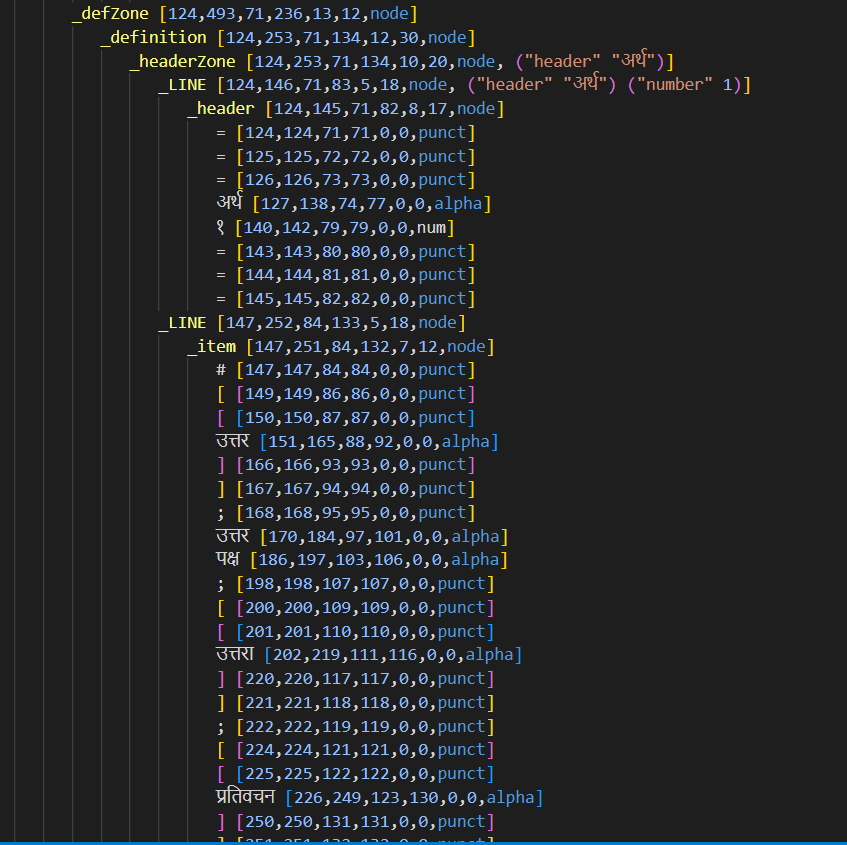
Today, I also continued working on building NeWiktionary analyzer. I wrote more analyzer sequence to divide and categorize word remaining word content. For example, I wrote rules in NLP++ to recognize definitions and put them under node called defZone that includes definition and its examples. Under the defZone, I created another rule called “item” that identifies all the definitions and put them as item1, item2, and so on as shown in fig. below:

fig.1: Analyzer sequences to parse definitions and itemize them

Week 6 Day 2: Initiation of developing NeWiktionary Analyzer

Today, I started building Nepali Wiktionary Analyzer (NeWiktionary Analyzer) for which I am using text files, each having a Nepali word entry in the Wiktionary. At first, I am parsing word contents and developing general rules using NLP++ to create structured data. For example, today I parsed the data of text files line by line and then cleaned the data by removing whitespace. Then, I wrote rules to put headings of each content of word such as pronunciation, part of speech, definition, etc. I create analyzer sequences of definition, header, and headerZone, each having corresponding content, for example, definition analyzer finds definitions and put it under a node called “definition” based on its rule.

For reference, one of the text file content is as follows:

==नेपाली==
जवाफ

==उच्चारण==
[javāpha], [javaapha]   

==पदवर्ग==
नाम

===अर्थ १===
# [[उत्तर]]; उत्तर पक्ष; [[उत्तरा]]; [[प्रतिवचन]]

====उदाहरण==== 
# श्यामले आफ्नो [[प्रियसी]]लाई छोडेर जाने कारण सोध्दा प्रियसीले केहि [[जवाफ]] दीनन। 

==समानार्थी शब्द== 
[[उत्तर]], [[प्रतिक्रिया]], 

==व्युत्पन्न सर्तहरू== 
[[जवाफदेही]], [[जवाफ माग्नु]], [[जवाफ दिनु]]
 
==अनुवाद== 
अङ्ग्रेजी: [[answer]], [[reply]], [[response]]

I first imported two library passes i.e. “lines.nlp” and “whitespace.nlp” that parses file line by line and remove whitespace respectively. The code rules are as follows:

Rule to parse line by line:

@NODES _ROOT

@RULES

_BLANKLINE <-
    _xWILD [min=0 max=0 matches=(\  \t \r)] ### (1)
    \n ### (2)
    @@

_LINE <-
    _xWILD [min=0 max=0 fails=(\r \n)] ### (1)
    _xWILD [one match=(\n _xEND)] ### (2)
    @@

Rule to remove white spaces

@NODES _LINE

@POST
    excise(1,1);
    noop();

@RULES

_xNIL <-
    _xWHITE [s] ### (1)
    @@

Then, I wrote the following rule to parse all the headers and post it under “_header” if it meets the rule pattern:

@NODES _LINE

@POST
X("header",2) = N("$text",3);
single();

@RULES
_header <-
	_xSTART						### (1)
	_xWILD [plus match=(\=)]	### (2)
	_xWILD [plus fail=(\=)]		### (3)
	_xWILD [plus match=(\=)]	### (4)
	_xEND						### (5)
	@@

Similarly, I wrote another analyzer sequence i.e. headerZone that includes the titles of each word content type as follows:

@NODES _ROOT

@PRE
<1,1> var("header");
<2,2> varz("header");

@POST
S("header") = N("header",1);
single();

@RULES
_headerZone <-
	_LINE	### (1)
	_xWILD [plus]	### (2)
	@@

Week 6 Day 1: Procedure of “Word Entry to Wiktionary” Writing and Recruitment Cntd..

Today, I worked on writing a detailed procedure for “How to Add Words to Nepali Wiktionary” and added it to my website as a draft.

Then, I send it to David to review the procedure and provide me feedback. Based on his feedback, I made changes and published it on my website which can be accessed using this link: https://nepalinlp.org/procedure-of-word-entry-to-nepali-wiktionary/.

Recruitment Continuation

With an aim to influence more people to join my mission of building the Nepali Wiktionary, I shared the updated mission statement page to the Facebook Nepali NLP Forum. I also updated the press release of the Nepali NLP Initiative and published it on the website based on the new mission statement.

A Nepali student of Computer Science from Nepal found my Facebook forum and reached out to me to know about my mission and vision and how it can be useful for his goal i.e. to develop a career counseling chatbot in the Nepali language. It is a happy moment to know that my effort is being noticed and appreciated by Nepalese people.

Week 5 Day 5: Rewriting of Mission Statement and Nepali Rank Page Development

To clarify my mission and touch people’s hearts, David (my mentor and developer of NLP++) and I brainstormed on how to make people more interested in this project of building Wiktionary. As a result, I ended up rewriting the mission statement so that people would be able to feel the importance of building a Nepali Wiktionary to preserve our language and culture in the 21st century. The updated mission statement can be accessed here: https://nepalinlp.org/mission-statement-2/.

Nepali Rank Page Development

I also created a page called “Nepali Rank” under the mission statement through which people can view where the Nepali language stands and what its rank is in Wiktionary. The rank is based on the number of page entries each language consists of. This page can be accessed here: https://nepalinlp.org/nepali-rank/. This lower ranking of Nepali language (#150) would may be an eye-opening for people to understand why it is important to build the Wiktionary.

Week 5 Day 4: Recruitment Advertisement and creation of text files for newly added words

Discussion on Wiktionary

I reached out to the top 10 contributors of Nepali Wiktionary and wrote messages for collaboration on the discussion page of each contributor. As a result, I could hear back from two of the contributors. One was a non-Nepali speaker, but he provided me positive feedback along with a link to a discussion forum of the Nepali community on Wiktionary. I also heard back from another contributor and he showed interest and he has been following my Nepali NLP Forum page on Facebook as well.

Press Release on Facebook

I finalized the press release (https://nepalinlp.org/nepali-nlp-initiative/) and uploaded it on my Facebook page to invite people to collaborate to build Nepali Wiktionary. I have been receiving lots of appreciation for starting this project and taking this initiative to make the Nepali language thrive in the 21st century.

Inviting more people to Nepali NLP Facebook Discussion Forum

I have been inviting Nepali speakers who may be interested in this project to collaborate and help in building the Nepali Wiktionary. Up to now, I have 44 followers on this “Nepali NLP Forum” Facebook discussion page. I have come to know about a Nepalese person who has been involved in building Wikipedia having all the information about Nepal. I reached out to him and I am meeting him soon to discuss and receive feedback from him on how I can take this project ahead. He would have gained much more experience in recruiting people to build Wikipedia so, I believe that he can provide great insights and approaches to recruit people for my project and accomplish my mission.