Week 2 Day 3: Training on NLP++

Today, I attended a meeting with David, my mentor, and Lucas, another intern of my mentor who is also working on Wiktionary data using NLP++. Lucas was running an NLP++ analyzer on WikiText obtained from Chinese Wiktionary, which was in the form of header, dictionary, and synonyms. In this meeting, I learned about the following:

  • Loading .txt file to the NLP++ and creating an ANALYZERS in VisualText; Once an ANALYZER is created, it is tokenized in the ANALYZERS SEQUENCE
  • Writing rules to parse the text by understanding the repeated pattern
  • Running the ANALYZER SEQUENCE on a particular .txt file
  • Testing the ANALYZER SEQUENCE if it has worked by looking at the tree file, highlighted text for each ANALYZER SEQUENCE, and the final tree for overall ANALYZER SEQUENCE; the tree is formed from parent node i.e., ROOT to many child nodes as required to analyze the data in the .txt file.

Later, I also had a one-to-one meeting with my mentor. In that meeting, he helped me load a .txt file which is cleaned data of “1000 most common Nepali words”, create ANALYZER on VisualText, create rules under ANALYZER SEQUENCE to parse the text file, and run it on actual text data.
Week 2 Day 2: Azure Account Setup and Pre-processing Training Data

Microsoft Azure Account Setup

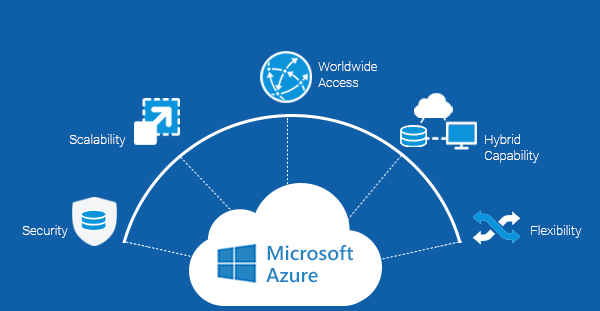
To run big data from Wiktionary, I will need Azure to build and test our NLP++ parser and analyzer on Cloud. Therefore, I signed up for a free account on Azure using the following link:

I also received $200 credit through that account that I will be using later while working on building and testing our NLP++ analyzers.

Pre-processing Training Data

We planned to start with small data to parse and run the NLP++ analyzer. Therefore, I am using the following data as training data:

First, I downloaded the HTML source file of the above webpage. Then, I cleaned the data by deleting extra HTML codes for layout, menus, and paragraphs. With this, the only remaining data is the table having 1000 most common Nepali words. The next step will be to write rules on NLP++, parse the words from the table, and put them in a format that will be used to run the NLP++ analyzer on it. The cleaned version of training data is saved in the .txt file.

Week 2 Day 1: Resolve HPCC systems access issues and NLP++ Training

HPCC Systems Access Issues

I was having issues accessing hpccsystems.com or training documents available there that I needed to complete ECL training. Therefore, I reached out to the Help Desk, hpcc systems team, and the ECL team. I later came to know that I am supposed to wait for approval once I create an account. Because I didn’t know this in the beginning, I end up creating another account and the Help Desk also created another email address.

Later, when I tried to access the HPCC systems website with a newly created email address, I received an email from the HPCC System team that my previous account has already been approved. Then, I asked her to help me with setting up my new username and password based on her recommendation, and I now can access the website. All thanks to the team!

NLP++ Training

Meanwhile, I started the training on NLP++. I watched all the following videos provided by my mentor that helped me set up extensions and get familiar with NLP++ and VisualText environment.

Week 1 Day 5: Brainstorming about future direction of the project

Research on available resources

Today, I and my mentor, David De Hilster brainstormed about future direction of our project. In the beginning our short-term plan was to extract the data from Wiktionary in the form of wikitext, parse them, and build a Nepali dictionary using NLP++. When doing background research, I found that the following three existing Nepali dictionaries that can be very helpful resources to start with:

Additionally, we also discussed if we would like to either use English version of Nepali words or Nepali version itself as a input data for building dictionary. To use Nepali version of wikitext we were wondering if there is a Wikipedia page written in Nepali. I looked for it and I found https://ne.wikipedia.org/wiki is available in Nepali version. Also, I found 1000 most common Nepali words: https://1000mostcommonwords.com/1000-most-common-nepali-words/. One of the possible future direction would be to use these available nepali dictionaries, compare and match the words from dictionaries to Wiktionary, and if the words are not listed in Wiktionary then, I will be add those words to Wiktionary using NLP++.

Week 1: Day 3 & 4: ECL Training Cntd. and Cyber Defense Onboarding Security Training

Cyber Defense Onboarding Training

Meanwhile, I started another training assigned to me by the Cyber Defense Awareness Team which is a part of the onboarding Program. The training name is: CDA-RSG Cyber Defense Onboarding Curriculum_Day 1_2022. I am going through its training documents and taking the survey at the end of it. I also completed the Notice of RSG Phishing and Training Programs.

ECL Training Cntd..

I started lesson of ECL training where I have to download the training data, open ECL Watch and log in window displays. However, I opened the ECL Watch, it never takes me to log in window. Then, I reached out to Robert Foreman to get help on this. Additionally, I could not find out the training data mentioned in the training video and I asked about this too to Robert. Then, he asked me if I am logged in to the Risk domain and sent me the following links to access training data:

The first two links are private to Risk users whereas the last link is public. When I tried to access the above links I could not access the first two links saying that “can’t reach this page”. In the beginning, I created an account using my Clemson email as my username, but when I tried logging in with my risk credentials, I received the error message, “this account is locked or not activated yet. Therefore, I contacted the help desk and asked them to see if my account is locked then, he told me that he could not find any account with my username or first or last name for the risk domain and he provided me an email address to reach out to. I wrote an email to RIS-GLONOC@lexisnexisrisk.com and I received help via MS Teams. That problem still couldn’t get resolved and he created a ticket for this issue. I am waiting for their response.

once I will have my login credentials setup for the risk domain then, I will have access to training data and ECL Watch as well.

Nepali Language Enrichment: Leveraging Wiktionary for NLP

Nepali is an under-resourced language when it comes to its presence in the domain of Natural Language Processing (NLP). Nepali is my native language and I feel that it is my responsibility to take an initiative and work on making Nepali language popular, formal, and eventually make it counted as rich-resourced language on online platforms. The best possible way to make this happen is by adding all the existing Nepali words to the Wiktionary which will work as a foundation for other enthusiastic people to further research in NLP on Nepali Language. Therefore, this summer, I propose to use the Nepali words and phrases available on Wiktionary, parse them, create structured data for dictionaries, and do the analysis using an NLP++ analyzer. To use words and phrases on Wiktionary, I will first have to download those words and upload them to the ECL (Enterprise Control Language) cloud, access them using NLP++ plugins, and run them on local VisualText.

Week 1 Day 2: Training on ECL

The goal for this week is to complete training on ECL, download all the required software to access NLP++ plugins, and run it on local editor i.e. VisualText.

Today, I completed the first three course menu under “Introduction to ECL (Part 1)”. By doing this, I could able to accomplish the following tasks:

  • Downloaded ECL IDE and client tools for Windows
  • Downloaded tools for Windows 64 bit
  • Turned the Hyper-V windows features on in my PC to access HPCC Virtual Machine (VM)
  • Downloaded compatible version of Hyper-V i.e. version 8.2 to access the VM
  • Learned three different ways to access ECL IDE through tutorial videos
  • Learned about two types of clusters:
    • Thor (Data refinery)
      • ECL agent (HThor)
    • Roxie (Rapid data delivery engine)

With this, I completed my training on ECL lesson 01.

Things that I had issued with

While following the ECL video tutorials I faced some issues which are listed below:

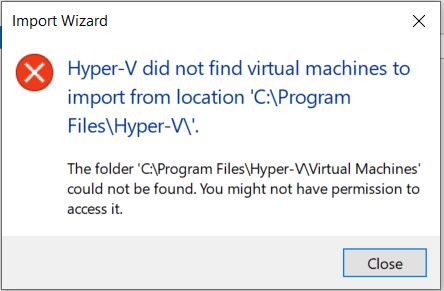
  • After downloading Hyper-V I could able to open Hyper-V Manager, but when I clicked on “import virtual machine” under the “action” menu and selected the path where I downloaded Hyper-V. I received the following error message as in fig.1.
Fig. 1: Error message to import VM

I used another way and I can now see the name of my PC added as a VM and I am able to connect to “Windows 10 MSIX packaging environment” through my PC.

Week 1 Day 1: Account Setup, Planning and Training

Account Setup

I started my first day by attending a virtual meeting with my manager and another intern who also joined today. I came to know an overview of another intern’s project and objectives. Based on the guidance of my manager, I called the Help Desk to set up my Gra access which is a two-factor authentication tool used by Lexis Nexis Risk Solutions. In the beginning, when I tried to log in to Office 365 I was getting an error message saying “incorrect user ID or password” though I was following the format and entering the correct user ID and password as recommended by my manager. Help Desk found out that my account was locked, and he had to reset the password for me. Now, I have access to office 365 (emails and MS Teams).

Planning and Setting Goals

I met with my mentor for a standup meeting which will occur daily for the first two weeks of the internship. We planned that I should spend my first week learning about ECL through HPCC Systems Training available on the HPCC system website followed by learning about NLP++ in the second week.

We also set our goal for this project. Our goal is to use the Nepali words and phrases available on Wiktionary, parse them, create structured data for dictionaries, and do the analysis using an NLP++ analyzer. To use words and phrases on Wiktionary, I will first have to download those words and upload them to the ECL cloud, access them using NLP++ plugins, and run them on local VisualText.

Training

Today, I started the training in ECL online class through which I came to learn about the trainers Richard Taylor and Bob Foreman.