
I continued parsing text extracted from “1000 most common Nepali words” webpage. With the guidance of my mentor, I created more NLP++ pass having rules to parse rows and columns and remove whitespaces, used built-in library such as KBFuncs, created other NLP++ passes such as KbInit, KbBuild and KbDisplay to parse and display the output in a specific format.
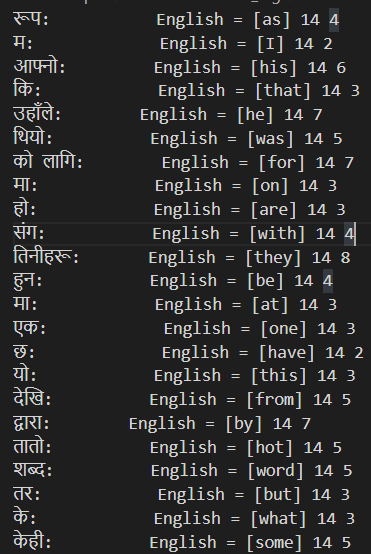
My goal was to display the Nepali words and English translation of those words next to each other in the same line with a colon in between and space equals to maximum number of bytes of longest word or phrase to put in the format as similar to columns in table. In this way, all the translated English word align next to Nepali words at the same place for better look and quick search. We could able to accomplish to put words with better alignment approximate to table format by adding colon just after each Nepali word and put English translation of those words in “English = [English word]” format as shown above in fig.1. However, we still couldn’t put it exactly like in a column aligned in the table. This is because the space taken by each character in English and Nepali is different. We found that a Nepali word having exactly an equal number of characters takes less space than an English word. Not only that, even Nepali words having equal number of character may also take different number of space/byte as shown in row 5 and 7, row 8 and 9. Though these Nepali words are of equal number of bytes, but one takes less space than others. To resolve this issue, we should convert all unicode to fixed width. Right now, NLP++ doesn’t support non-proportional font. Therefore, I could not put parsed words aligned all words in each rows to one place as in columns of the table.
In conclusion, today, I learned to use built-in library functions and create passes by calling functions to parse words in the desired format and display the final output either in .txt or .kbb file.
 Nepali NLP Initiative