
The goal for this week is to complete training on ECL, download all the required software to access NLP++ plugins, and run it on local editor i.e. VisualText.
Today, I completed the first three course menu under “Introduction to ECL (Part 1)”. By doing this, I could able to accomplish the following tasks:
- Downloaded ECL IDE and client tools for Windows
- Downloaded tools for Windows 64 bit
- Turned the Hyper-V windows features on in my PC to access HPCC Virtual Machine (VM)
- Downloaded compatible version of Hyper-V i.e. version 8.2 to access the VM
- Learned three different ways to access ECL IDE through tutorial videos
- Learned about two types of clusters:
- Thor (Data refinery)
- ECL agent (HThor)
- Roxie (Rapid data delivery engine)
- Thor (Data refinery)
With this, I completed my training on ECL lesson 01.
Things that I had issued with
While following the ECL video tutorials I faced some issues which are listed below:
- After downloading Hyper-V I could able to open Hyper-V Manager, but when I clicked on “import virtual machine” under the “action” menu and selected the path where I downloaded Hyper-V. I received the following error message as in fig.1.
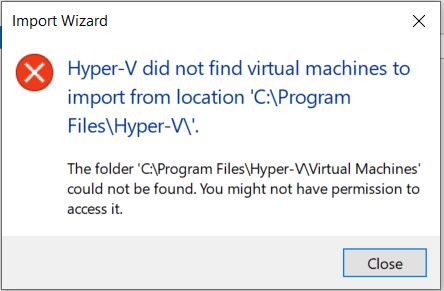
I used another way and I can now see the name of my PC added as a VM and I am able to connect to “Windows 10 MSIX packaging environment” through my PC.
 Nepali NLP Initiative